
Mastering Bit Manipulation: From Binary Basics to Advanced Patterns
A comprehensive guide to understanding how computers store numbers and leverage bitwise operations for elegant programming solutions

Have you ever wondered how computers actually store negative numbers? Or why certain mathematical operations seem to work like magic with just a few bitwise operators? If you've ever felt intimidated by bit manipulation problems or confused about two's complement representation, you're not alone. Let's embark on a journey from the fundamental concepts of binary representation to powerful programming patterns that will transform how you approach algorithmic problems.

1. The Foundation: How Computers Actually Store Numbers
Before we dive into the elegant world of bit manipulation, we need to understand the foundation upon which everything else is built. Every number in your computer's memory, whether it's a simple integer or a complex calculation result, exists as a sequence of zeros and ones. This isn't just a theoretical concept—it's the practical reality that enables all the patterns we'll explore.
1.1 Understanding Binary Representation
When we write int x = 5 in Java, the computer stores this as a 32-bit signed integer. Let's see what this actually looks like:
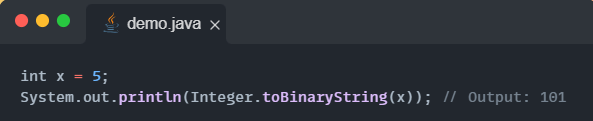
This output shows only the active bits, but the full 32-bit representation includes leading zeros. We can visualize the complete picture:

For positive numbers, this representation is straightforward—it's simply the binary equivalent of the decimal number. Let's visualize how the number 13 is stored:
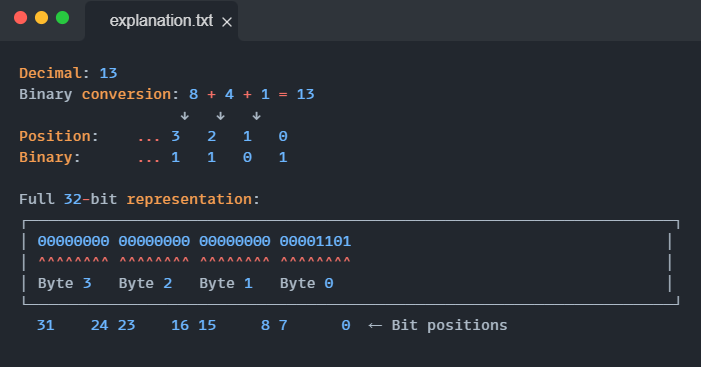
Notice how the leftmost bit (position 31) is 0, indicating this is a positive number. The remaining bits represent the magnitude.
1.2 The Mystery of Negative Numbers: Two's Complement
Here's where things become fascinating. How does a computer represent negative numbers using only zeros and ones? The answer lies in a clever system called two's complement, which Java uses internally for all signed integers.
To understand two's complement, imagine you're creating a system where you need to represent both positive and negative numbers, but you can only use a fixed number of bits. The brilliant insight behind two's complement is that it allows us to perform addition and subtraction using the same circuitry, regardless of whether the numbers are positive or negative.
Let's walk through how -5 is represented step by step with visual alignment:
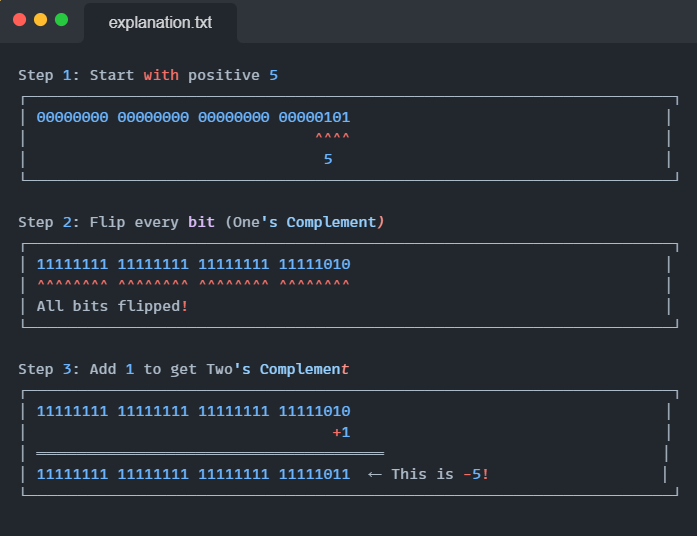
The key insight is that the leftmost bit (position 31) is now 1, indicating a negative number. This bit is called the sign bit.
1.3 Why Two's Complement Works So Well
The genius of two's complement becomes apparent when you consider arithmetic operations. When you add 5 + (-5), the binary addition naturally results in zero (with a carry bit that gets discarded). This means the same hardware that handles positive number addition can seamlessly handle subtraction and negative numbers.
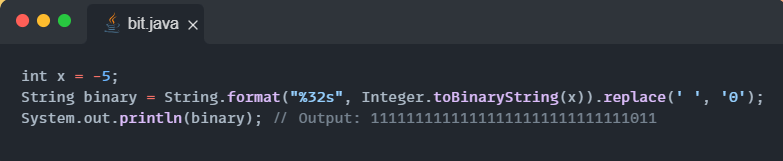
Understanding this representation helps explain some important boundaries in Java. Let's visualize the extreme values:
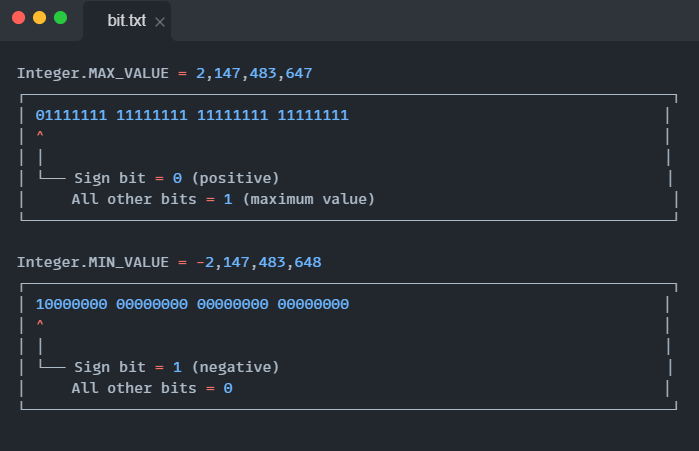
Notice the asymmetry: there's one more negative number than positive numbers in the range. This is because zero uses the "positive" pattern (sign bit = 0), leaving room for one extra negative value.
1.4 The Bitwise NOT Operator and Manual Two's Complement
The bitwise NOT operator (~) performs one's complement—it flips every bit. Combined with addition, you can manually create the two's complement:
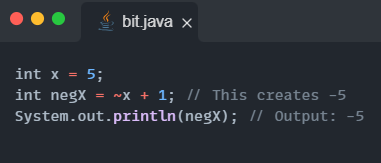
This relationship ~x + 1 = -x is fundamental to understanding many bit manipulation patterns we'll explore later.
2. Understanding Unsigned Interpretation
While Java doesn't have unsigned integers for the int type, it's crucial to understand how the same bit pattern can be interpreted differently. Consider the bit pattern 11111111111111111111111111111111:

This dual interpretation becomes particularly important when dealing with right shift operations, where the behavior differs significantly between signed and unsigned shifts.
2.1 The Tale of Two Shifts
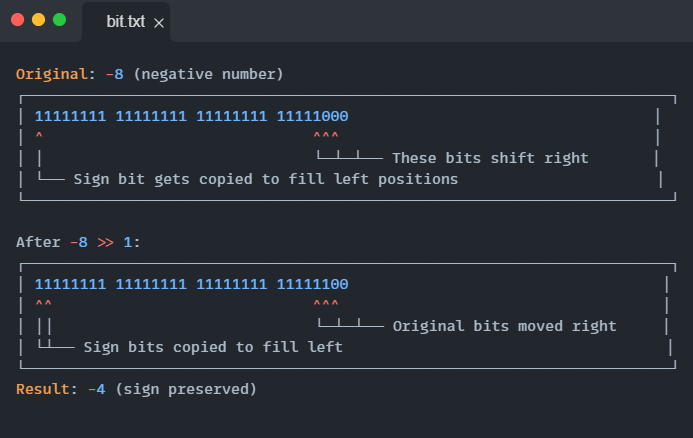
Java provides two different right shift operators, each with distinct behavior that becomes clearer when visualized:
Signed Right Shift (>>) - Preserves the sign:
Unsigned Right Shift (>>>) - Always fills with zeros:
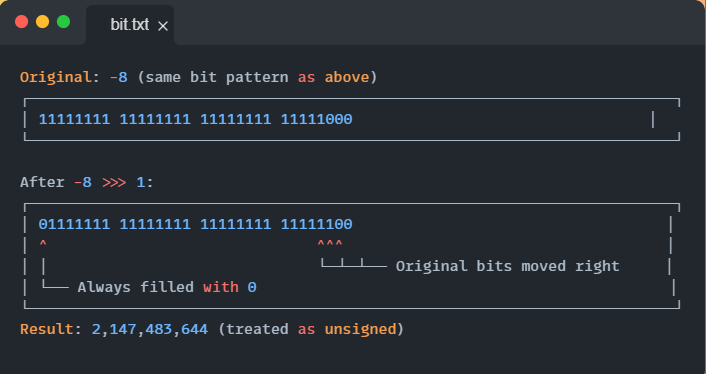
Understanding these differences is crucial for correctly implementing bit manipulation algorithms.
3. Essential Bit Manipulation Patterns
Now that we've established the foundation, let's explore the powerful patterns that make bit manipulation so elegant for solving complex problems.
3.1 Pattern 1: Isolating and Removing Bits
One of the most beautiful aspects of bit manipulation is how simple operations can achieve seemingly complex tasks. Let's start with two fundamental operations that appear in countless algorithms.
Isolating the Rightmost Set Bit
The expression n & -n has an almost magical property—it isolates the rightmost set bit in a number. Let's visualize why this works:
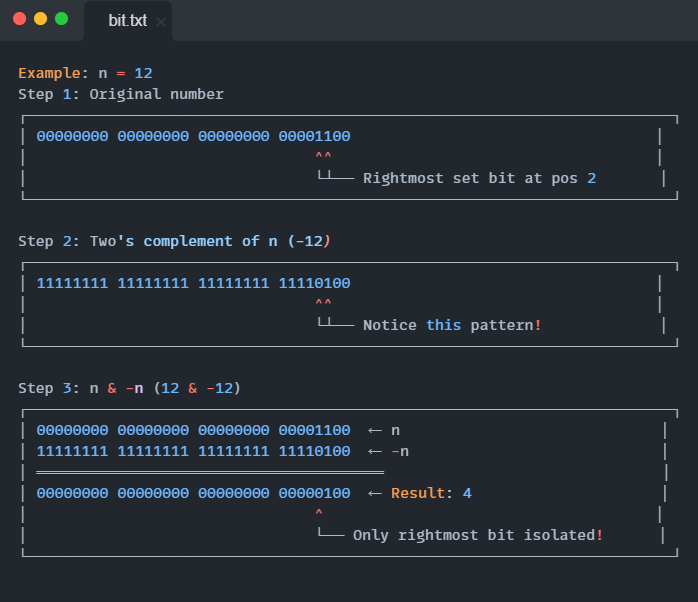
This works because in two's complement, -n flips all bits and adds 1. The addition creates a "carry" that propagates up to the rightmost set bit, making that position the only place where both n and -n have a 1.
Removing the Rightmost Set Bit
The expression n & (n - 1) removes the rightmost set bit:
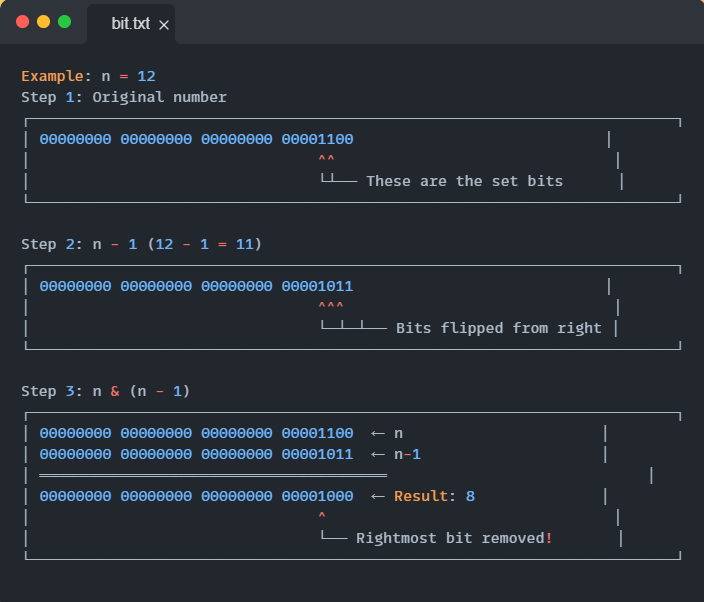
Subtracting 1 flips all bits from the rightmost set bit down to bit 0. The AND operation then eliminates the rightmost set bit while preserving all others.
3.2 Pattern 2: Power of Two Detection
Understanding what makes a number a power of two helps us appreciate this elegant test. A power of two has exactly one bit set in its binary representation. Let's visualize this:
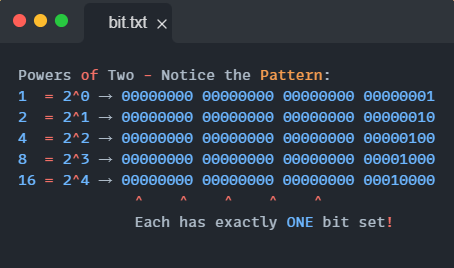
This pattern leads to an elegant test using our bit removal technique:
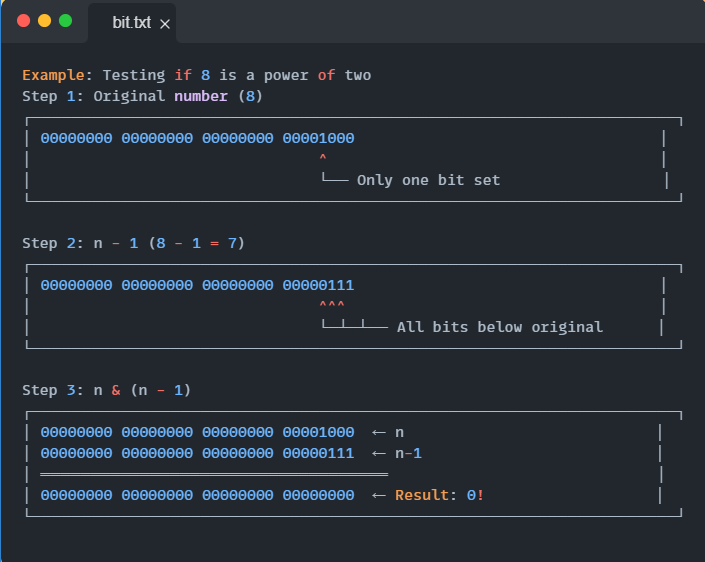
When a number is a power of two, n & (n-1) equals zero because the single set bit in n aligns with a gap in n-1, and all other positions have complementary bit patterns.
3.3 Pattern 3: Bit Masking Operations
Bit masking is the cornerstone of bit manipulation, allowing us to set, clear, toggle, and check specific bits within a number. Think of each bit position as a switch that can be independently controlled.
Setting a Specific Bit
To set the i-th bit (0-indexed from the right), we use the expression n | (1 << i). Let's visualize how this works:
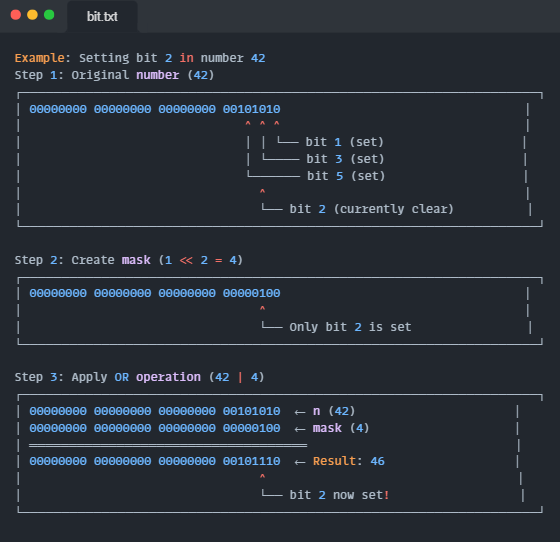
The OR operation sets the target bit to 1 while leaving all other bits unchanged.
Clearing a Specific Bit
To clear the i-th bit, we use n & ~(1 << i). Here's the visual breakdown:
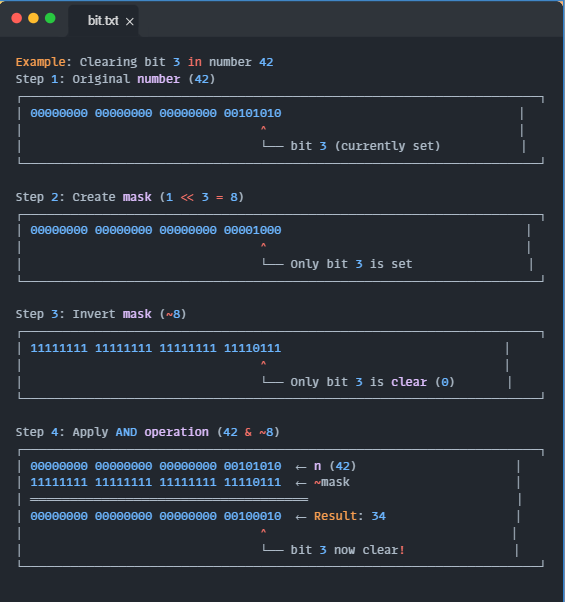
The AND operation with an inverted mask clears the target bit while preserving all others.
Toggling a Specific Bit
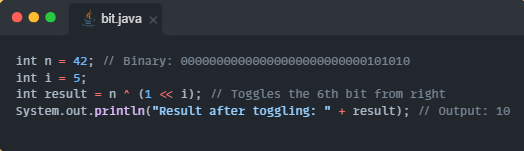
To toggle the i-th bit, we use n ^ (1 << i):
Advanced Masking: Clearing Ranges of Bits
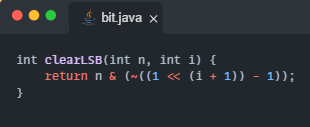
Sometimes we need to clear multiple bits at once. Here are two useful patterns:
To clear bits from position 0 to i (inclusive):
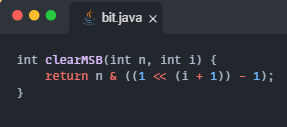
To clear bits from position i+1 to the most significant bit:
3.4 Pattern 4: The XOR Swap Trick
XOR has a unique property: a ^ b ^ b = a. This property enables us to swap two variables without using additional memory:
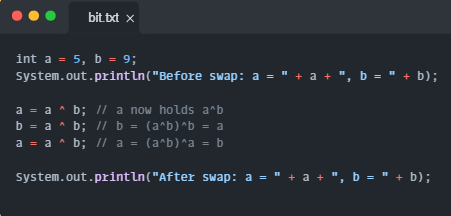
While this is more of a curiosity in modern programming (due to potential issues with compiler optimizations and readability), it demonstrates the power of XOR's self-inverse property.
3.5 Pattern 5: Finding the Single Element
One of the most elegant applications of XOR is finding a single element in an array where every other element appears twice:
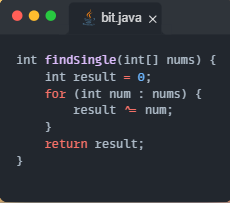
This works because XOR is both commutative and associative, and a ^ a = 0. All the paired elements cancel out, leaving only the single element.
3.6 Pattern 6: Generating Subsets with Bit Masking
Bit masking provides an elegant way to generate all possible subsets of a set. Each bit position in a number represents whether an element is included in the subset:
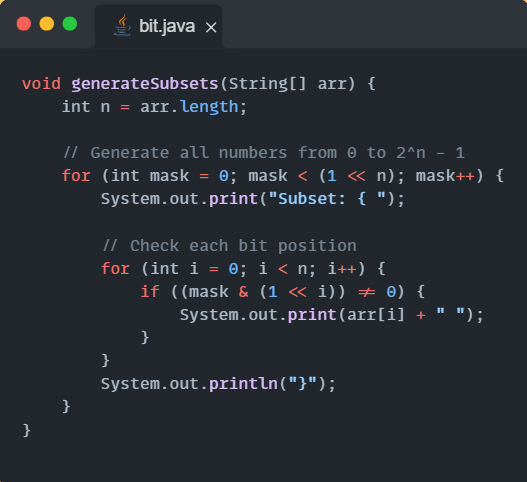
or an array ["a", "b", "c"], this generates all 8 possible subsets by treating each number from 0 to 7 as a bitmask.
3.7 Pattern 7: Finding Two Non-Repeating Elements
When an array contains two elements that appear once and all other elements appear twice, we can find both unique elements using a clever application of XOR:
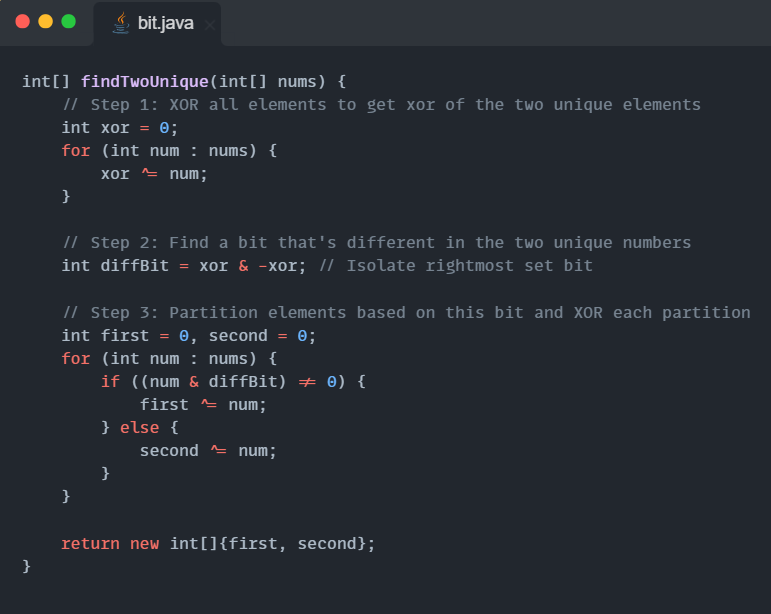
This algorithm works by partitioning the array based on a bit that differs between the two unique elements, then applying the single element finding technique to each partition.
3.8 Pattern 8: Character Case Manipulation
Understanding ASCII values reveals another elegant application of bit manipulation for character case conversion:
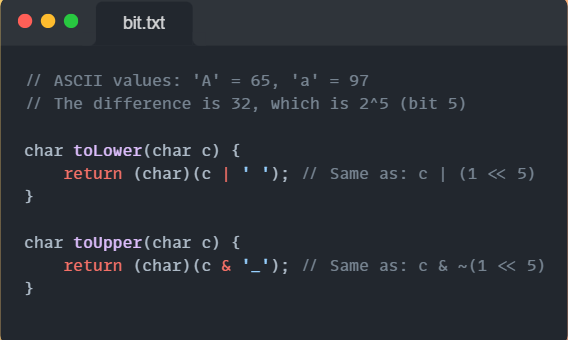
This works because the only difference between uppercase and lowercase letters in ASCII is the 5th bit.
Common Pitfalls and Best Practices
As you begin applying these patterns, be aware of common pitfalls:
Integer Overflow: When performing bit shifts, be careful of overflow. 1 << 31 creates Integer.MIN_VALUE, not a positive number.
Signed vs Unsigned Operations: Always consider whether you need signed or unsigned right shifts. The >>> operator can be crucial for certain algorithms.
Readability: While bit manipulation can be elegant, always prioritize code readability. Add comments explaining the bit manipulation logic.
Testing Edge Cases: Always test with edge cases like 0, Integer.MIN_VALUE, and Integer.MAX_VALUE.
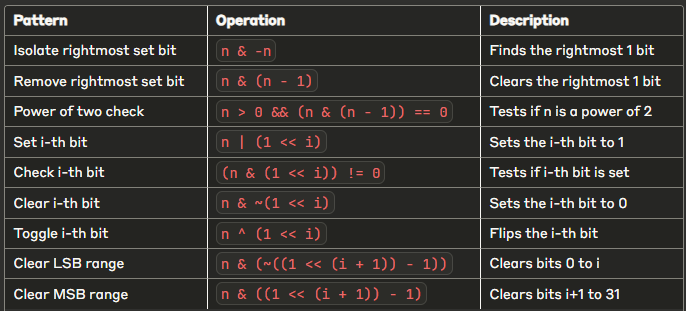
Quick Reference
References
Happy bit manipulating!